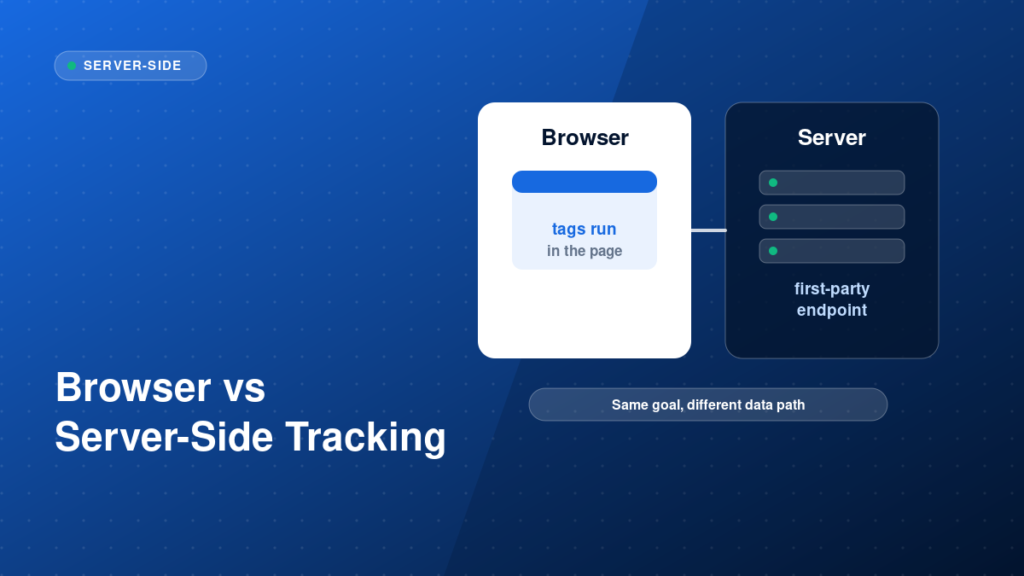
Browser-side tracking runs tags in the visitor’s browser. Server-side tracking sends data to a server you control first, and that server forwards it to vendors such as GA4, Google Ads and Meta. Neither is automatically better. This guide compares them so you can decide what fits your business.
Key takeaways
- Client-side tracking is simpler; server-side tracking gives more control over data.
- Server-side GTM adds hosting and maintenance work.
- It can improve data durability and let you filter what is sent, but it is not a way to ignore consent.
- Validate both layers, because a server container can also be misconfigured.
Client-side and server-side: what actually changes
In a client-side setup, the browser loads each vendor script and sends data directly to that vendor. In a server-side setup, the browser sends one request to your own tagging server, and the server forwards data to the vendors. That extra step lets you control what leaves your infrastructure, set first-party cookies and reduce the number of scripts on the page.
Our server-side tracking service handles planning, setup and validation.
Step-by-step implementation
1. Decide whether you need server-side
Server-side is most useful for businesses with meaningful ad spend, e-commerce or lead value, where data quality and privacy control matter. For a small brochure site, a clean client-side setup may be enough.
2. Plan the architecture
Choose a hosting approach for the server container, a first-party subdomain for the endpoint, and which tags will move server-side first, usually GA4 and Meta CAPI.
3. Send data from the web container
Configure the web container to send events to your server endpoint, keeping event names and parameters consistent.
4. Configure clients and tags on the server
In the server container, add clients to receive requests and tags that forward events to each platform, with the right mappings and deduplication.
5. Handle consent and privacy
Pass consent state to the server and respect it there. Remove or hash personal data you do not need to send.
Example: a first-party endpoint for the server container
https://data.example.com/g/collectCommon mistakes
- Assuming server-side tracking removes the need for consent.
- Moving everything at once instead of starting with high-value events.
- Skipping monitoring of the server, so outages go unnoticed.
- Duplicating events by leaving browser tags active for the same platform without deduplication.
- Underestimating hosting and maintenance costs.
Testing and validation
Use the server container Preview mode alongside the web container Preview. Confirm requests reach the server, clients claim them, tags fire and vendors receive the events. Then compare event counts in the vendor dashboards with the previous setup and with real backend data.
Practical checklist
- Reason for going server-side documented
- Architecture and hosting decided
- First-party subdomain configured
- Event schema kept consistent
- Deduplication planned
- Consent passed to the server
- Server preview and vendor diagnostics tested
- Monitoring and ownership assigned
FAQ
Is server-side tracking worth it for small sites?
Often not at first. Start with a clean client-side setup and move server-side when data quality or privacy control justifies the cost.
Does server-side tracking bypass ad blockers?
It can reduce some losses, but it does not remove the need to respect user choices and consent.
Where do Meta events fit?
Meta CAPI is a common first server-side use case. See Meta Pixel and Conversion API explained.
Next steps
Choose the architecture that matches your data needs, then validate it end to end. If you want help deciding or building, explore our server-side tracking service.