Form submissions are the most common conversion for service businesses, and one of the most frequently mis-tracked. Many setups fire when a button is clicked, even if validation fails and nothing is sent. This guide shows how to detect successful submissions properly in Google Tag Manager and send them to GA4, Google Ads and Meta.
Key takeaways
- Track successful submissions, not button clicks.
- The most reliable method is a dataLayer event pushed by the site after success.
- Form listeners and thank-you page triggers are fallbacks with known limits.
- Test with valid, invalid and repeated submissions.
Why form tracking breaks
A click on the submit button does not mean a lead was sent. Validation errors, spam filters and AJAX forms mean the page may not change at all. Standard GTM form triggers do not work on many modern forms, because they submit with JavaScript and never fire the built-in form submission event.
If you want this implemented cleanly, see our Google Tag Manager setup service and conversion tracking service.
Step-by-step implementation
1. Identify how your form submits
Find out whether the form reloads the page, redirects to a thank-you URL or submits with AJAX. In Preview mode, submit the form and watch what GTM detects.
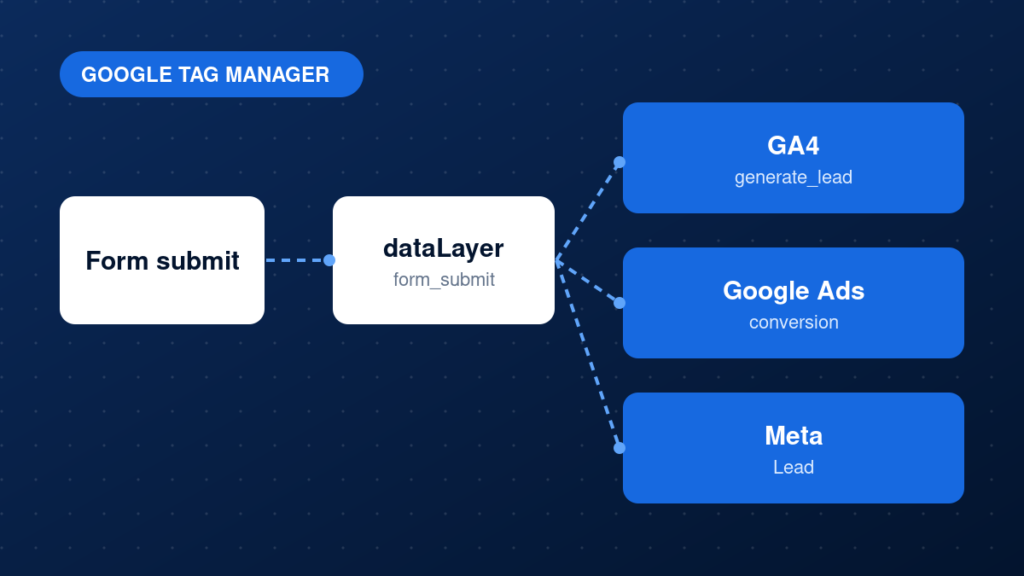
2. Prefer a dataLayer event
Have the form plugin or site code push an event when the submission succeeds. Many plugins, including Contact Form 7, dispatch a success event you can listen for.
3. Create a custom event trigger
In GTM, create a Custom Event trigger for the event name, for example form_submit. Add conditions such as the form ID if you have several forms.
4. Create the tags
Add a GA4 event tag such as generate_lead, a Google Ads conversion tag and a Meta Lead tag, all using the same trigger.
5. Use a thank-you page only as a fallback
If the form redirects to a dedicated thank-you page that cannot be opened directly, a page view trigger on that URL is acceptable. Prevent visits without submission where possible.
6. Avoid personal data in analytics
Do not send names, emails or phone numbers to GA4 as event parameters. Send non-personal values such as form name.
Example: a listener for Contact Form 7 success events
document.addEventListener('wpcf7mailsent', function (e) {
  window.dataLayer = window.dataLayer || [];
  window.dataLayer.push({
    event: 'form_submit',
    form_id: e.detail.contactFormId,
    form_name: 'contact_form'
  });
}, false);
Common mistakes
- Firing conversions on button click instead of successful submission.
- Using the built-in form trigger on AJAX forms that never fire it.
- Sending emails or phone numbers to GA4 as parameters.
- Tracking a thank-you page that can be opened directly.
- Firing separate tags on different triggers, causing duplicates.
Testing and validation
In Preview mode, submit the form with valid data and confirm the event fires once and all tags run. Then submit with an invalid field, and confirm nothing fires. Submit again to check for double counting. Finally confirm the events in GA4 DebugView and the conversion status in Google Ads and Meta.
Practical checklist
- Submission method identified
- Success event pushed to the dataLayer
- Custom event trigger created with conditions
- GA4, Google Ads and Meta tags share one trigger
- No personal data sent to analytics
- Valid, invalid and repeated submissions tested
- Events confirmed in every platform
- Container published with clear notes
FAQ
Why does the GTM form trigger not fire?
Many forms submit with AJAX and never trigger the built-in form submission event. Use a dataLayer or custom event instead.
Can I track forms without a developer?
Sometimes, if your form plugin exposes a success event. Otherwise a developer or specialist can add a small script.
Should I track every form on the site?
Track the ones that represent business value, and give each a clear identifier.
Next steps
Accurate form tracking gives you real lead counts and better campaign optimisation. If you want it implemented and tested, see our conversion tracking service, or start with how to set up Google Tag Manager correctly.